Gmail is a reliable mail platform for personal and professional mail exchange. It is user friendly
service as well still if users face any problems, utilizing anything on Gmail, they may acquire
instant assistance anytime with Gmail Contact Number.
service as well still if users face any problems, utilizing anything on Gmail, they may acquire
instant assistance anytime with Gmail Contact Number.

In any event, when you utilize the safe and secured mail platform online, Gmail, you can't cut
yourself off totally from spam. It can't be eliminated however can be filtered. This is all the
better you can do and Gmail service can assist you with dealing with this to keep away from
any deplorable consequences.
yourself off totally from spam. It can't be eliminated however can be filtered. This is all the
better you can do and Gmail service can assist you with dealing with this to keep away from
any deplorable consequences.
Your email user will more likely than filter out spam, moving unwanted email messages to a
separate folder. In any case, that isn't great. Some spam tricks the filter and will end up in the
inbox. And some valid messages end up in the spam mail folder, called false positives.
separate folder. In any case, that isn't great. Some spam tricks the filter and will end up in the
inbox. And some valid messages end up in the spam mail folder, called false positives.
Below are Some Basic Ways to Manage Spam Mails:
· Train Filter
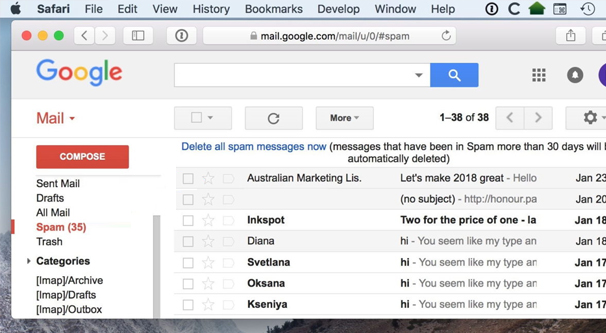
When you consider spam in your account inbox, simply don't remove it. Pick it, and advise
your mail customer this message is spam.
your mail customer this message is spam.
· Never Reply to Spam
On the off chance that before you open anything you know as spam, don't open it. If you open
it and understand that its spam then closes it. Try not to click a link, or download a file or
document from a post you even think remotely is spam.
it and understand that its spam then closes it. Try not to click a link, or download a file or
document from a post you even think remotely is spam.
At the point when you opened a spam account since it appeared to come from a friend or associate,
promptly contact them and let them realize their account has been compromised.

promptly contact them and let them realize their account has been compromised.
· Hide Email Address
The more individuals have your email Id, the more spam you'll get. Keep your address to you.
Try not to distribute it on the web. Offer it shrewdly. Utilize different locations whenever
required.
Try not to distribute it on the web. Offer it shrewdly. Utilize different locations whenever
required.
· Use a 3rd-Party Anti-spam Filter
Most important security suites accompany an anti-spam filter that can enhance the way in which it
recognizes spam. In the event that you need you may likewise utilize such filters software.
recognizes spam. In the event that you need you may likewise utilize such filters software.

This can assist you with avoiding any online issues made due to spam in Gmail. In any event,
when not all spam email messages are suspicious, they can be destructive and accordingly it is
smart to utilize powerful strategies for spam management and if you need more tips for this,
you may contact Gmail Support Number UK.
when not all spam email messages are suspicious, they can be destructive and accordingly it is
smart to utilize powerful strategies for spam management and if you need more tips for this,
you may contact Gmail Support Number UK.


